1. Home
  2. Integrations
  3. t Cron

t Cron

Available triggers

The Cron component allows triggering events at specific time intervals.

URI Syntax: cron:name

Main fields

Path parameters

Name
Description
Default
Type
name (consumer)(required) Name of the cron trigger—String

Query parameters

Name
Description
Default
Type
schedule (consumer)The cron expression that will start the integration execution—String

Example

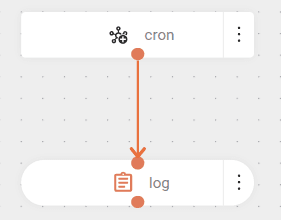
The snippet below configures a cron trigger to fire every 10 seconds.

Then, the message "Integration triggered" is logged.

Result

Cron Expression

A cron expression is a string consisting of 6 or 7 whitespace-separated fields. Fields can contain any allowed values, along with various combinations of the allowed special characters for that field. The fields are as follows:

Field name
Required
Allowed values
Allowed special characters
SecondsYES0-59, - * /
MinutesYES0-59, - * /
HoursYES0-23, - * /
Day of monthYES1-31, - * ? / L W
MonthYES1-12 or JAN-DEC, - * /
Day of weekYES1-7 or SUN-SAT, - * ? / L #
YearNOempty, 1970-2099, - * /

Meaning of main special characters

Special character
Meaning
*All values in the field.
?No specific value (used in "day of month" and "day of week" fields). Useful when you need to specify something in one of the two fields where the character is allowed, but not in the other. For example, if I want my trigger to fire on a specific day of the month (say, on the 10th), but don't care what day of the week that happens to be, I would put "10" in the day of month field and "?" in the day of week field.
-Range of values (all values included in the range).
,List separator for values (only specified values).
/Incremental values. For example, "0/15" in the seconds field means "at seconds 0, 15, 30, and 45".

Examples

Cron expression
Meaning
0 0 12 * * ?Fires at 12 PM (noon) every day
0 15 10 * * ? 2005Fires at 10:15 AM every day during the year 2005.
0 15 10 15 * ?Fires at 10:15 AM on the 15th day of every month.

For more information and examples, visit: Cron Trigger Tutorial.

Also check out Cron Expression Generator (Quartz).

IMPORTANT

Support for specifying both "day of week" and "day of month" simultaneously is not complete. Currently, you must use the '?' character in one of these fields.

How happy are you with this page?

We use cookies to enhance your experience on our site. By continuing to browse, you agree to our use of cookies.Learn more