- Home
- Integrations
- Do Try Do Catch Do Finally
Do Try Do Catch Do Finally
IMPORTANTIf any EIP configuration is not available in the form, you can adjust it directly in the main.yaml file. To do so, access the Source Code tab and edit the integration code.
The doTry EIP allows you to create integration flows involving a process in a "Try" block. It creates doCatch and doFinally branches to handle specific exceptions and ensure that certain actions are executed at the end, regardless of errors. With this, failures can be handled in a controlled manner, ensuring that the flow execution continues without unnecessary interruptions.
Configuring the doTry EIP in the Diagram
To configure a doTry in an integration in the Diagram tab, follow these steps:
Click +Add Step on the canvas.
Select the EIPs tab.
Select the doTry EIP. You can use the search tool to locate it.
When adding the EIP to the canvas, three branches will be automatically created:
- Empty step: by clicking Add Step, you add the EIP or component that will continue the flow. Only one branch of this type is allowed in the "Try" block.
- doCatch: captures and handles specific exceptions that may occur within the "Try" block. If there are multiple "doCatch" blocks, it executes the exception that is captured first.
- You can insert one or more exceptions in the Exception field.
- doFinally: this block is always executed, regardless of whether an exception occurred or not (even if there is no doCatch block). The "doFinally" branch will always be the rightmost one. Only one "doFinally" branch is allowed for each doTry EIP.
NOTEYou can add other "doCatch" type branches by clicking "+" and then Add Handling Step.
Deletion of the doTry EIP and its branches
There are three deletion scenarios for the doTry EIP and its branches:
-
When deleting a "doCatch" block, all steps in that branch will be removed.
-
When deleting a "doFinally" block, all steps in that branch will be removed.
-
When deleting a doTry EIP, all blocks and subsequent steps will be removed.
Example
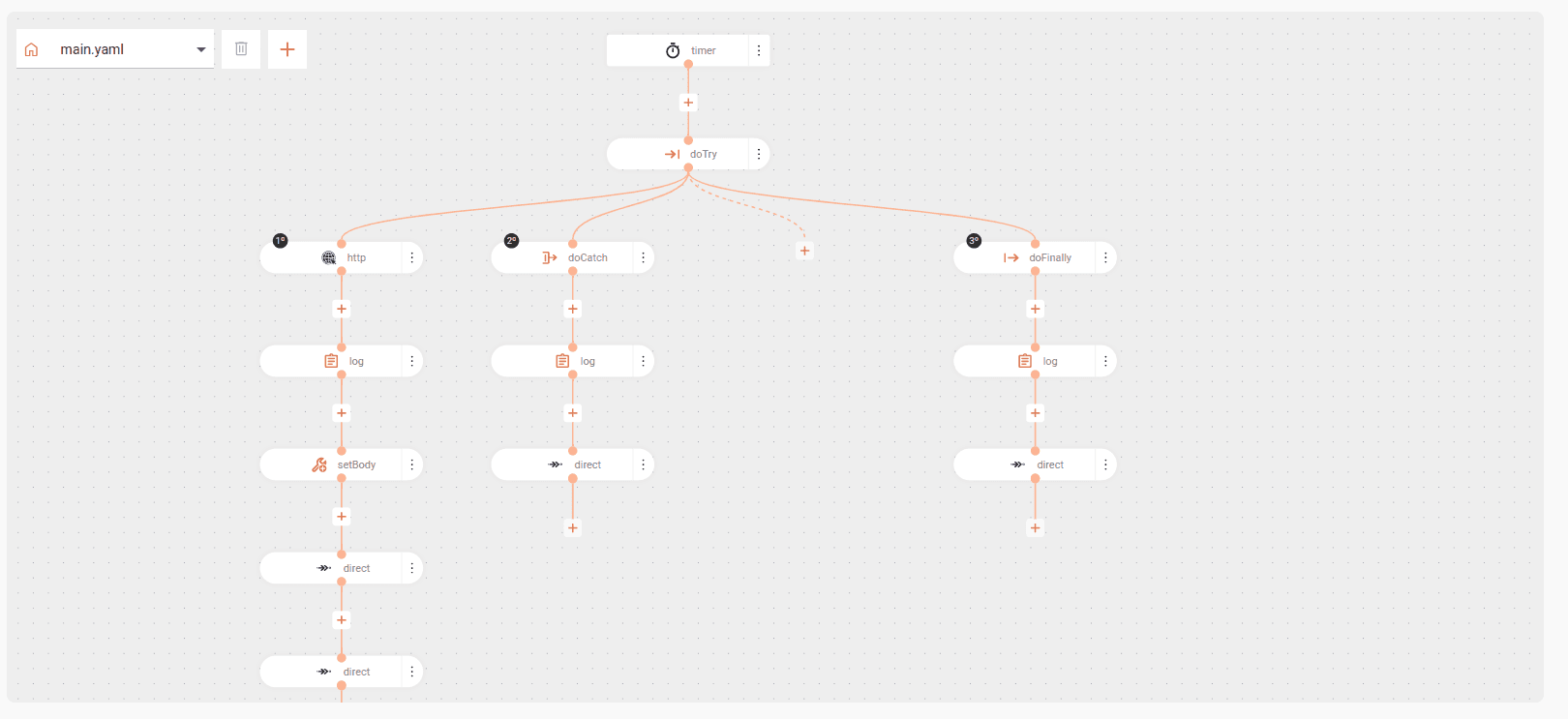
-
The flow starts with a timer, which is triggered every 60 seconds to query orders from an ERP.
-
The flow attempts to access the ERP to get orders and process them with doTry. The order is then sent directly to the financial system and the status is updated in the ERP.
-
If there are connection errors, such as ConnectException or SocketTimeoutException, these errors will be captured with doCatch, logged, and a notification will be sent to the IT team.
-
Regardless of whether the flow was successful or failed, the integration process will be finalized with an audit record and a log generation with doFinally.
Check the example in code format: