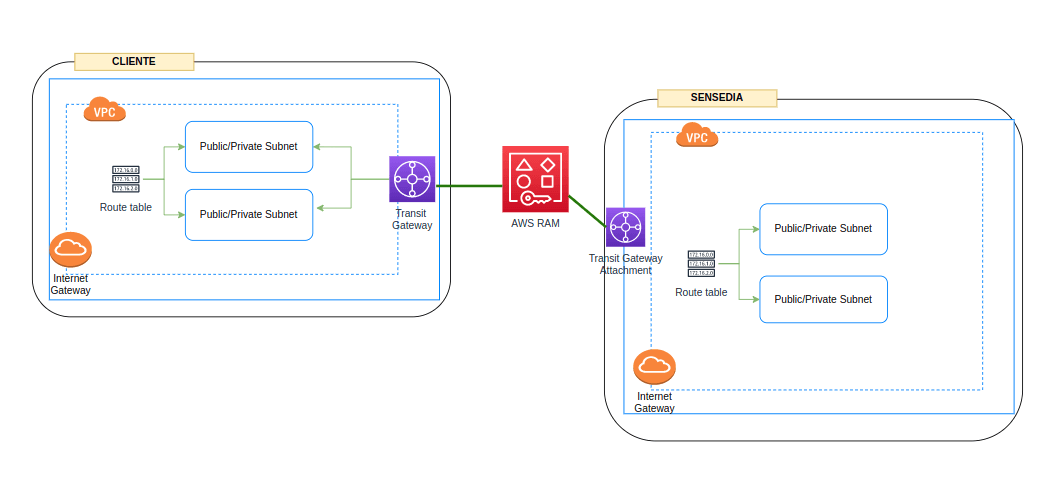
The AWS transit gateway must be created in the same region used by Sensedia Integrations.
The steps to request and configure the new connectivity using AWS transit gateway are described below:
Order | Activity | Responsible |
|---|---|---|
| 1 | Open a ticket in Zendesk, indicating the need for this type of connectivity. In this ticket, it is important to share the CIDRs of the networks that will be accessible via AWS transit gateway. Possible commercial validation may be necessary. | Customer |
| 2 | Create the AWS transit gateway in the account that hosts the services (backends) to be accessed by Sensedia Integrations. | Customer |
| 3 | Attach the VPC and subnet hosting the backends to the AWS transit gateway. | Customer |
| 4 | Share the AWS transit gateway with the Sensedia team via ticket. For this step, it will be necessary to obtain the Sensedia account ID. This ID may vary according to the environment configuration done for each customer. | Customer |
| 5 | After sharing, an invitation will be generated for the Sensedia account. The technical team will accept this sharing. | Sensedia |
| 6 | The Sensedia team will attach the VPC hosting Sensedia Integrations to the AWS transit gateway shared by the customer. | Sensedia |
| 7 | The Sensedia team will share the CIDR of the VPC used to host Integrations. | Sensedia |
| 8 | Configure routes and firewall rules to ensure access from the Sensedia VPC is guaranteed. | Customer |
| 9 | The Sensedia team will also add routes related to the CIDRs informed in step 1. | Sensedia |
| 10 | Test the connection. This can be done in two ways: 1. Creating an integration whose destination is a backend contained in the networks linked to the transit gateway (recommended). 2. Running tests via network tools. | Customer/Sensedia |
NOTEIf you have questions about how to create and configure the AWS transit gateway, we recommend consulting AWS support. Sensedia's technical team is available to support in establishing communication and conducting connectivity tests.
We use cookies to enhance your experience on our site. By continuing to browse, you agree to our use of cookies.Learn more