- Home
- Integrations
- Supported Connectivity Models
Supported Connectivity Models
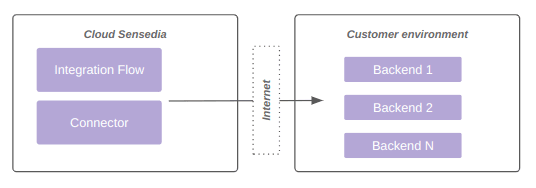
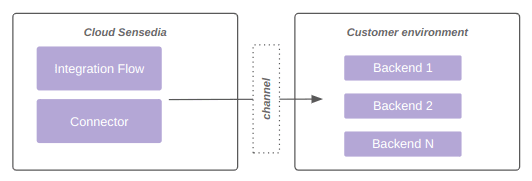
The data plane can be connected to public and private environments for:
Consumption of public backend for integration, as shown in diagram 1:
Consumption of private backend, as shown in diagram 2:
Supported connectivity models
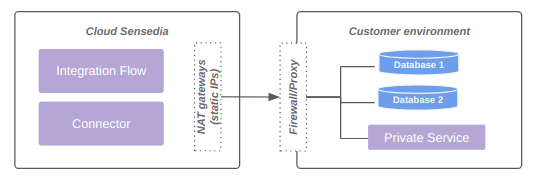
Allow list (default)
Positive points
- Most recommended model due to practicality and resilience.
- Each data plane has at least 2 fixed outbound IPs. These IPs can/should be used for firewall controls on the client side.
- Cost already embedded in standard offers.
Limitations
- It is not possible to access backends without externalization through a proxy or similar technology.
The diagram below represents connectivity via allow list:
VPN (upon request)
Positive points
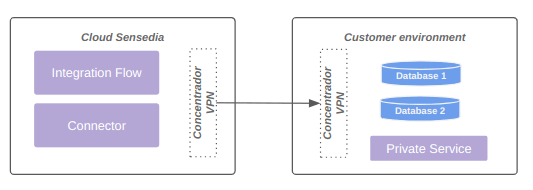
- Model with private access.
Attention points
- Shared responsibility.
- SLA is different for environments with VPN, given the high incidence of problems.
- Higher cost of configuration, maintenance, and troubleshooting.
Limitations
- Each data plane can be connected to up to 4 networks, limited to 8190 IPs.
- Currently BGP is not supported.
The diagram below represents connectivity via VPN:
VPC peering (upon request)
Positive points
- Stability and resilience.
- Simplified configuration.
Attention points
- Offer available only to customers whose backend is also allocated on AWS.
Limitations
- Each data plane can be connected to up to 4 networks, limited to 8190 IPs.
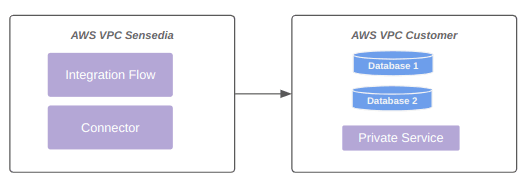
The diagram below represents connectivity via VPC peering:
Transit gateway (upon request)
Positive points
- Possibility to access backends through private link.
- No need to use VPN.
- Greater flexibility in communication between VPCs.
- Within AWS limits, essential points regarding transit gateway and connectivity are adjustable.
NOTEFor more information, see the documentation on quotas for transit gateways.
Attention points
- Customer must share the AWS transit gateway with the Sensedia account.
- Need to create routes on both Sensedia and customer sides.
- AWS billing rate occurs on both sides (Customer and Sensedia), as AWS charges per VPC attached to the AWS transit gateway, and this happens on both sides.
Limitations
- Each data plane can receive up to 5 unique AWS transit gateway attachments.
- AWS transit gateway limits also apply.
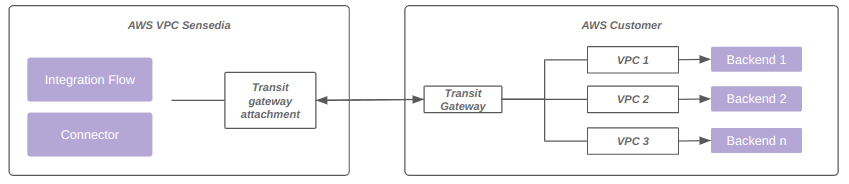
The diagram below represents connection via transit gateway:
NOTEFor more information, access the documentation about connectivity with AWS transit gateway.
Direct connect (upon request)
Positive points
- Possibility to access backends through private link.
Attention points
- Cost.
- Shared responsibility model between Sensedia, customer, and link provider.
Limitations
Each data plane can be connected to up to 4 networks, limited to 8190 IPs.
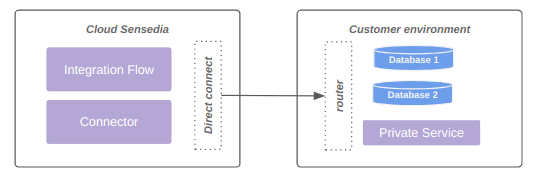
The diagram below represents connection via direct connect:
WARNINGNetworks larger than 8190 hosts (/19) are not supported.
PrivateLink (upon request)
Positive points
- Facilitates communication between components on AWS.
- Ensures private access with high resilience.
Negative points
- Requires exposure through NLB on the client side.
Private DNS name
- According to AWS documentation, it is possible to use a name with your own domain in the endpoint service, such as
<service>.customer.com.br. This name is private, as AWS registers it in a local DNS zone for VPCs connected to the endpoint service. - The advantage is being able to consolidate service exposure in a single name for different service consumers.
- Customers who wish to use the functionality need to enable and validate the endpoint service to use the selected name. Once configured, the customer should open a ticket with Sensedia support, requesting activation of the private DNS name and informing the endpoint service in question.
Limitations
- Up to 4 VPC endpoints (enabled by AWS PrivateLink) are supported per data plane.
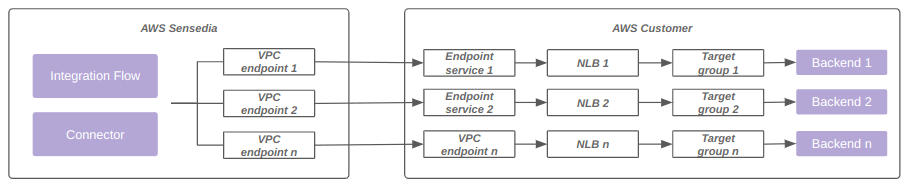
The diagram below represents connectivity using a VPC endpoint enabled by AWS PrivateLink:
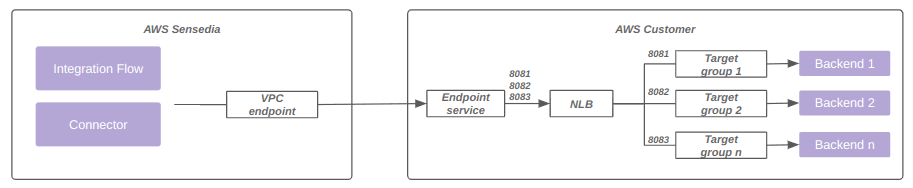
Additionally, it is possible to use the same VPC endpoint associated with the same load balancer, with multiple ports and target groups.
The diagram below represents this model:
NOTEFor more information, see the official AWS documentation on PrivateLink.