- Home
- Integrations
- Integrations Guide
Integrations Guide
Integrations using Apache Camel allow you to orchestrate data exchanges between systems in a standardized way, using components, routes, and processing rules.
In Integrations, you can create these integrations visually and intuitively through drag and drop and forms, while maintaining the flexibility to use and view code when needed, combining practicality and technical power in a single environment.
Integration Flows
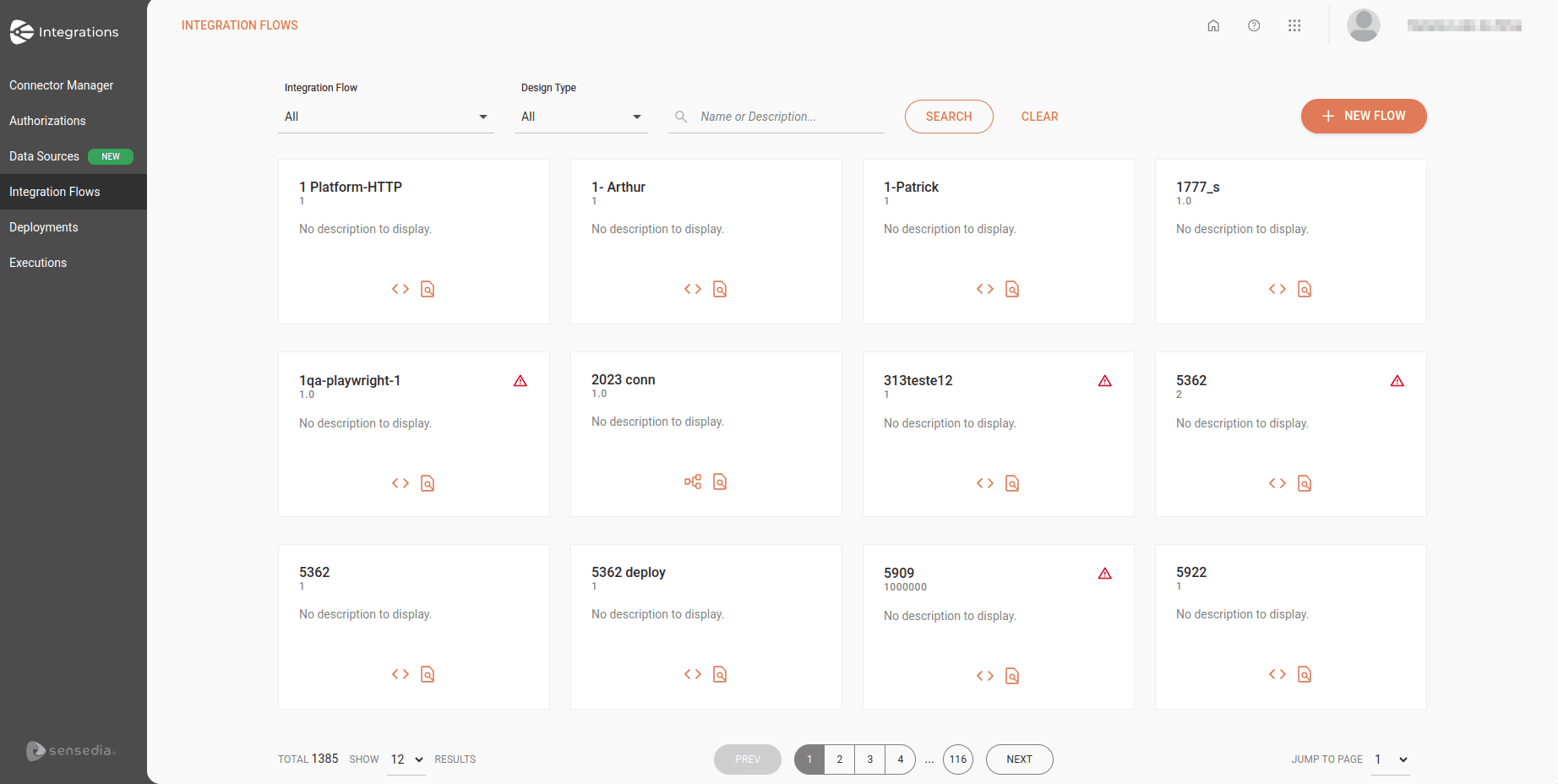
The Integration Flows screen displays the last 12 integration flows created, arranged in cards in alphabetical order.
Each card will display:
-
The name and version of the integration flow
-
A description (optional)
-
Shortcut to the workspace for Diagram & Source and Canvas (legacy) type flows, respectively:
- Diagram & Source Code

- Canvas

- Executions

- Diagram & Source Code
If there are any inconsistencies, you will see an alert icon  in the upper right corner of the card.
To create a new integration, click + NEW FLOW.
See how to create a new integration.
Filters
At the top of the screen, you can search for integration flows using the following filters:
-
Integration Flow: select All or With issues.
-
Integration Type: select the integration flow design type: Diagram & Source Code, Canvas, or All.
To search for a specific integration flow, type the name or a word from the flow description in the search box and click SEARCH.
Integrations Guide
Building Integrations
See the step-by-step guide to create, configure, version, and deploy your integrations in an environment.
AI Copilot
Learn how to use AI Copilot to streamline the creation and configuration of your integrations.
Advanced Settings
Check the advanced settings for Resources and Flow Variables.
EIPs
Learn about the Enterprise Integration Patterns (EIPs) available for use in Integrations.
These patterns help orchestrate and structure the flow, including routing, splitting, aggregation, and message control.
Triggers
Check the trigger-type components available to start flows in Integrations.
They are responsible for activating integration execution based on external events, cron, queues, and other input mechanisms.
Data Sources
Learn how to access and query databases using the JDBC component.
Deployment Management
Track deployment status and perform management actions.
Expression Languages
Learn about the Expression Languages available for data evaluation and transformation in Integrations.
They allow you to access values, compare information, and manipulate messages during the integration flow.
Observability and Monitoring
Check the execution logs of deployed integrations. With logs and traces support, you ensure greater traceability and efficiency in troubleshooting.
Example - Payment Management
Check out a complete example of a payment management integration.