- Home
- Integrations
- JSON Transformation v2
JSON Transformation v2
JSON Transformation v2 is a step that facilitates the manipulation and transformation of JSON data between different systems and applications. It is an essential resource for ensuring data consistency and compatibility between various APIs and data sources.
To transform JSON v2, you will use the JSONata language. For support, the JSONata Exerciser can be accessed directly from the step form. In it, you can:
- Define the structure of the input data.
- Create transformation expressions that generate the output data in the desired format.
- Check for errors in the expression.
NOTETo understand this language in detail, consult the official JSONata documentation.
IMPORTANTWe currently provide two versions of the JSON Transformation component. In version 2 (v2), there is no option to select the input data (input data), since you can use the input and output data from previous steps in JSONata.
Below, learn how to add JSON Transformation v2 to the canvas and configure its form.
Add JSON Transformation v2 to the canvas
Click the  icon in the left editing menu.
Select JSON Transformation v2 to add it to the canvas.
You can use the search bar  to find it.
NOTEYou can add it more than once. In this case, each time the tool is added, a number is appended to the name (JSON Transformation v2 1, JSON Transformation v2 2, JSON Transformation v2 3).
Connect JSON Transformation v2 to the flow steps. This tool can connect with one previous step and one subsequent step.
TIPTo copy the step, click the
button. If the step form is already configured, the settings will be copied as well.
To delete JSON Transformation v2 from the canvas, select it and click the  button.
Configure the form
Select JSON Transformation v2 on the canvas.
Click the edit icon  .
.
Fill in the Name field with a unique name for the step. By default, you will see "JSON Transformation v2".
Add the transformation expression in the JSONATA box. If there are any errors in the expression, you will see a red message in the lower right corner of the box.
NOTEYou can access the JSONata Exerciser to create it by clicking GO TO JSONATA. Then, copy and paste the expression from JSONata Exerciser into the box.
TIP
Click SAVE.
Example
See an example of an integration flow with JSON Transformation v2 in the GIF:
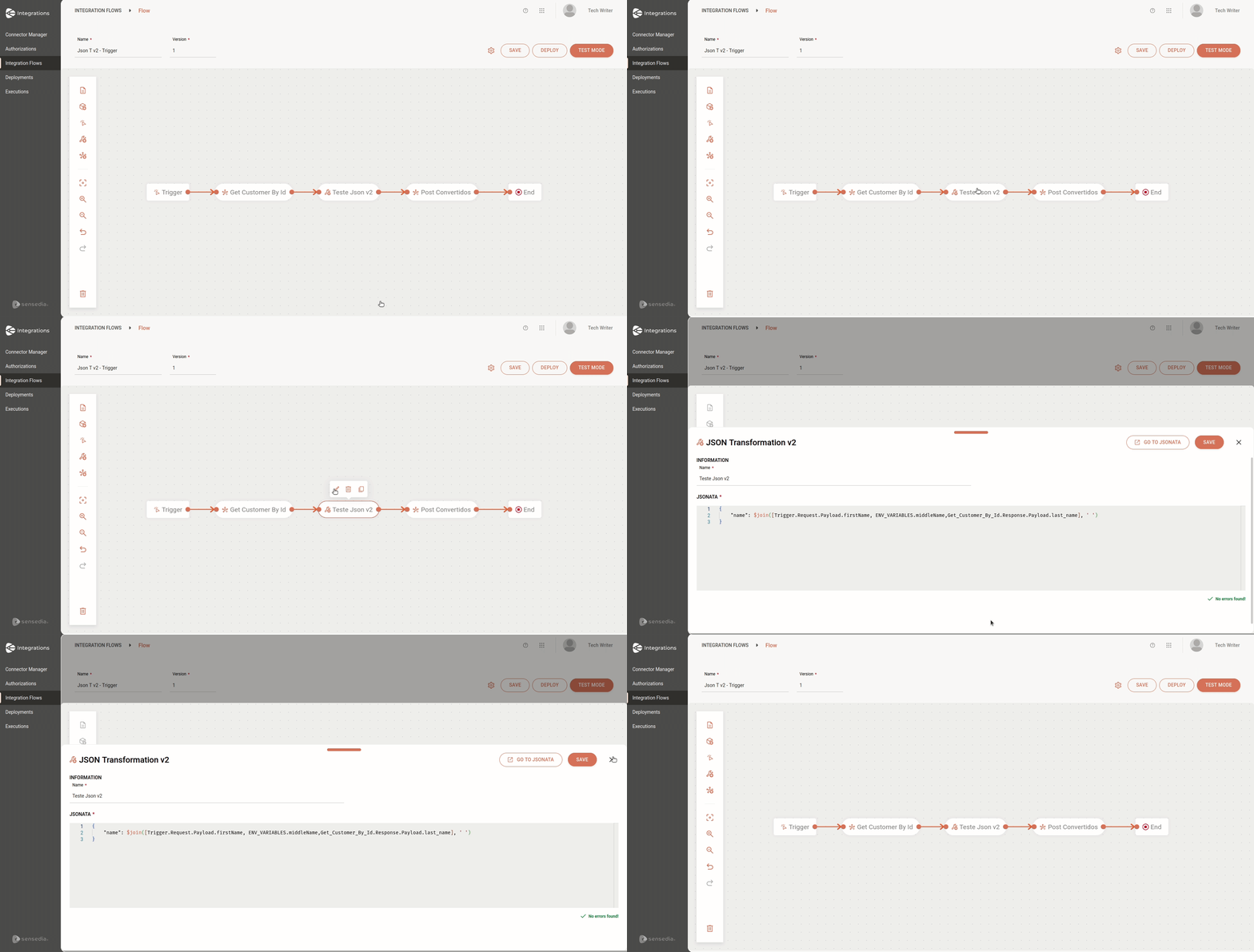
In the example, we have the following components that will be used in the transformation expression in the JSONATA box:
-
REST type trigger, whose request payload contains the
first namefield. -
Environment variable
middleName. -
Get Customer by Id connector, whose response payload contains the
last namefield.
This way, the information from the first name, middleName (environment variable), and last name fields will be combined into a single field: name.