- Home
- Integrations
- t Slack
t Slack
The Slack component allows you to send messages, notifications, and alerts to Slack channels or users directly from your integration flows.
URI Syntax: slack:channel
Main fields
Path parameters
Query parameters
Example
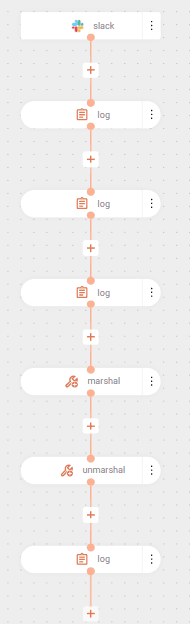
The flow below receives messages sent in a public group and demonstrates two ways to access the message content: through Java methods and through conversion to Map via JSON.
The flow starts when a message is sent in the outros-assuntos channel on Slack. The parameters indicate the conversation type (public channel) and the authentication token.
Then, the body of the received message is logged as ${body}.
The second log shows the class type of the received object with ${body.class}, which will be com.slack.api.model.Message.
Since the message is a Java object, the getText() method is used to get the text: ${body.getText()}.
Next, the message is converted to JSON with the marshal EIP.
Then, the message is converted to Map with the unmarshal EIP, making it easier to access the data.
Finally, after conversion to Map, the text field is accessed directly using index notation: ${body[text]}.