- Home
- Integrations
- c SMB
c SMB
The SMB component allows the flow to integrate with directories shared via SMB/CIFS protocol, enabling files to be sent directly to a remote server.
The integration supports sending multiple files in a single execution and allows configuring control parameters and message headers to customize the processing and routing of sent files.
URI syntax: smb:hostname:port/shareName
Main fields
Path parameters
Query parameters
Example
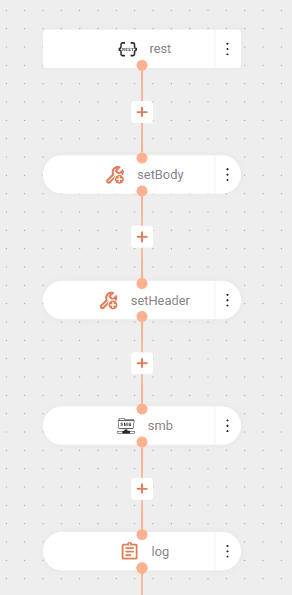
The flow below sends a file to an SMB server:
The flow is triggered by a GET request on the /test endpoint.
The body (setBody) of the message is set to the text It worked!.
The header (setHeader) CamelFileName is set to poc-smb.txt, indicating the name of the file that will be created/sent.
The content is sent to an SMB share (Windows File Share) at address server-example, port 445, in the myshare share. The parameters are the username and password credentials.
After sending, a log is recorded with the message Successfully completed.