Event
The EVENT step involves defining what should be monitored and also includes the MONITORED ACTIVITY section:
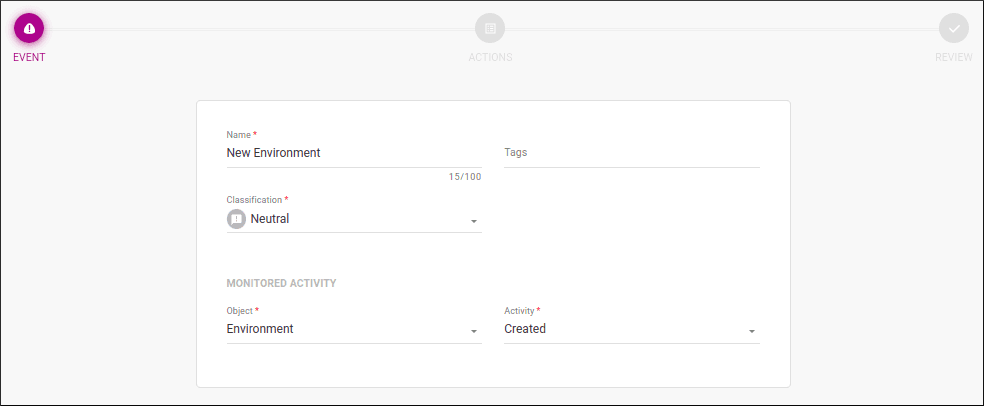
These are the fields to be completed:
- Name: a name to help identify the alert (does not need to be unique).
- Tags: an optional field to add tags that can be used to find alerts more easily (both in the Platform Events screen and in Triggered Alerts). You can add up to 50 tags per alert, and each tag can have up to 70 characters.
TIPTags are used to categorize alerts according to labels that make sense for your business. For example, you can add tags to identify APIs by business unit, to distinguish development or test environments related to monitoring, or even to indicate the developers responsible for the alerts. The idea is to think of useful categories so you can quickly find the alerts you need later!
- Classification: classification, which represents the level of criticality. Options: Neutral, Success, Warning, and Critical.
TIPClassification does not have a predefined meaning. The user can define the criticality of each action as they see fit, according to their business rules.
-
The MONITORED ACTIVITY section contains the following fields:
- Object: defines the object to be monitored and, if any interaction occurs, the alert will be triggered. See here for the available objects and the type of change monitored for each case.
- Activity: select the type of modification to the selected object that will trigger the alert.
In the image above, the selection field lists the modification options to be monitored for the environment object. If you choose created, every time an environment is created, it will trigger a notification with the environment name, information that it was created, the user who created it, and the creation date.
After entering the data, click NEXT to go to the ACTIONS step.