- Home
- Integrations
- t Google Pub/Sub
t Google Pub/Sub
The Google Pub/Sub component enables integration with the Google Cloud Pub/Sub service to publish and consume messages. It is ideal for asynchronous communication between applications, facilitating data exchange in distributed scenarios.
URI Syntax: google-pubsub:projectId:destinationName
Main Fields
Path parameters
Query parameters
Example
IMPORTANTBefore running the integration flow, import the Google Cloud service account key into a config map. This key will be used as a resource in the integration:
The "key.json" file contains the service account credentials in JSON format. In Integrations, this key will be configured as a Resource file.
Read more about Resources files.
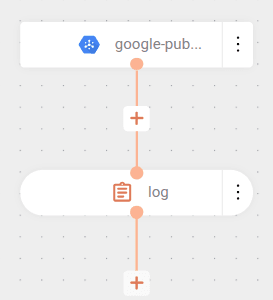
The integration subscribes to a topic (topic-01) through a subscription called camel-k and consumes messages published by another integration:
The flow starts with the connection to Google Cloud Pub/Sub through the google-pubsub component. In the URI, the project ID (registry-ipaas-testing) and the subscription name (camel-k) that will be monitored to receive messages are specified.
In the parameters, the serviceAccountKey is configured to point to the key.json file, containing the service account credentials needed to authenticate the connection to Google Cloud.
The flow processes received messages through the log component, which records both the message content (${body}) and its headers (${headers}), allowing visualization of data received from the subscription.
IMPORTANTA Pull-type subscription must be created in the Pub/Sub console for use in the code.